durs.ai
Prompt library

Prompts that work

Ready-made prompts for ads, logos, posters, 3D and more. Use one in a tap — or share your own.

+ Add a prompt
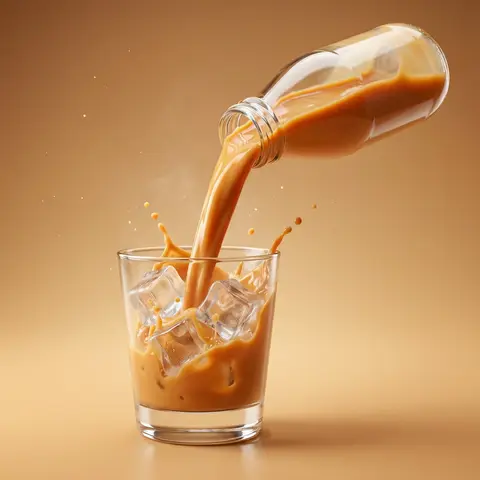
Dynamic Beverage Pour Into Glass Commercial Shot
AdvertisementPhoto

Dynamic Beverage Pour Into Glass Commercial Shot

Create a hyper-realistic commercial product photography of a exact uploaded product image as the main subject bottled beverage pouring dynamically into a clear glass. The bottle is tilted mid-air at a powerful angle, with a rich, creamy liquid flowing smoothly in a thick stream into the glass. The liquid appears silky, glossy, and highly appetizing, with realistic viscosity and smooth motion. Add dynamic splash effects: - controlled creamy liquid splashes rising inside the glass - subtle splash arcs and droplets frozen mid-air - natural fluid interaction with glass walls Include crystal-clear ice cubes inside the glass: - realistic transparency and refraction-slight frost and condensation on ice surface - interaction between liquid and ice (soft splash + displacement) Studio shot, ultra high resolution, sharp focus, 85mm lens look, f/2.8 depth of field. Background: clean studio ackdrop color-matched to the product tone (warm caramel orange, creamy beige, or flavor-inspired color) with a soft gradient. Surface matches background tone for seamless premium look with subtle reflection. Add subtle atmospheric details: - fine micro droplets in air - light mist or cold vapor around glass Lighting: cinematic studio lighting with: - strong rim light highlighting liquid edges and glass contours - soft top light enhancing liquid gloss - side light emphasizing texture and splash detail Glass is ultra clean with realistic reflections, refraction, and soft shadow grounding. Composition is bold, dynamic, and premium - high-end beverage advertising style. No text, no typography, no clutter, no identifiable ingredients. Ultra realistic, photorealistic, high dynamic range, cinematic color grading, glossy highlights. 4K-8K resolution, billboard-ready, sharp detail, realistic studio shoot look.
durs.ai
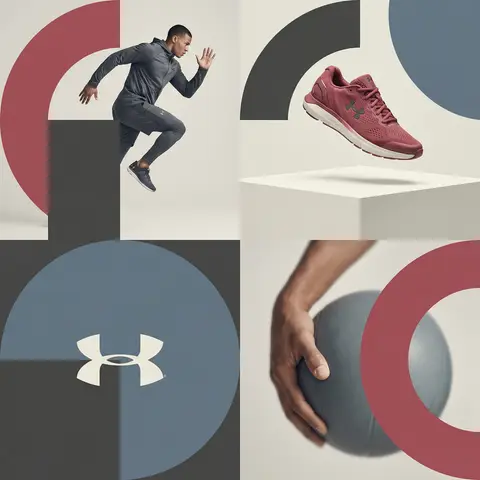
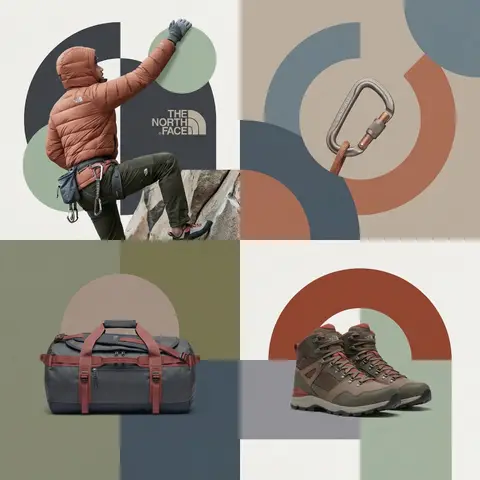
Editorial Grid Geometric Brand Campaign Visual
BrandingPhoto

Editorial Grid Geometric Brand Campaign Visual

BRAND NAME. Act as a World-Class Editorial Designer. PHASE 1: DYNAMIC SUBJECT LOGIC. - Subject Selection: Autonomously analyze BRAND NAME. - Layering (The Sandwich Effect): Interweave the subject with background shapes. Some parts of the car/person must be hidden behind geometric blocks, while other parts (wheels, limbs, props) must overlap them to create 3D depth. PHASE 2: GRID & GEOMETRY. - Layout: A clean 2x2 grid composition. - Overlays: Superimpose large, bold geometric arcs and circles over the grid. - Visual Balance: Place one iconic product prop (e.g., a floating key fob for cars or a ball for sports) in a separate quadrant to balance the subject. PHASE 3: SOPHISTICATED MUTED PALETTE. - Color Direction: DO NOT use aggressive neon or oversaturated colors. - Palette: Identify the core colors of BRAND NAME and shift them to a Sophisticated Muted spectrum. - Tones: Use desaturated, earthy, or dusty versions of the brand colors (e.g., instead of hot pink, use dusty rose; instead of bright mint, use sage green; instead of royal blue, use slate blue). - Finish: Matte, flat color blocks with zero gradients. PHASE 4: PHOTOGRAPHY & LIGHTING. - Subject Style: High-end commercial studio photography. - Lighting: Soft, diffused studio lighting with gentle highlights. No harsh shadows. - Integration: The subject must feel physically embedded into the graphic grid. PHASE 5: MINIMALIST BRANDING. - Logo: Place a clean, single-color BRAND NAME logo in the center of one background block. No taglines, just the iconic symbol.

durs.ai